
Quick Answer:
Server-side tracking gives B2B SaaS teams more control over how conversion data reaches GA4 and ad platforms. It can reduce browser-level signal loss, supports cleaner consent handling and helps send stronger revenue signals back into bidding systems. Client-side tracking still matters for browser context, but it should not carry revenue reporting alone.
TL;DR
- Client-side tracking fires JavaScript in the browser. It captures page behavior, UTMs, referrer data and session context. Browser privacy settings, ad blockers and cookie restrictions limit what reaches your reporting.
- Server-side tracking routes data through your own server before sending it to GA4 or ad platforms. It improves governed first-party signal delivery within consent rules and supports CRM enrichment, but it does not magically restore all blocked or unconsented data.
- Hybrid setups are the practical answer for most B2B SaaS teams with active paid programs. Client-side handles browser context; server-side handles delivery, enrichment and platform feedback.
- The tracking method is only part of the problem. If data flows without a unified architecture, even a well-configured server-side setup produces numbers that do not match in GA4, CRM and ad platforms.
Tracking gaps are costing your team attribution accuracy. Darwin can audit your current setup and identify where data is breaking.
Your tracking data can look complete while missing the events that matter for budget decisions. Browser privacy restrictions, iOS limitations and shortened cookie lifetimes all reduce attribution signal before it reaches reporting. When that signal is incomplete, budget decisions get built on gaps. Meta reports 13% lower cost per result and 19% more attributed purchase events with their Conversions API (CAPI). So which tracking method delivers more reliable data in 2026?
This guide compares client-side tracking against server-side tracking in Google Analytics 4 (GA4) to help you figure out which setup fits your needs and protects your data accuracy going forward.
Server-side tracking matters because it protects the signal between the website and the systems that use it. A form submission, page visit or conversion event only becomes useful when the same logic reaches GA4, CRM, ad platforms and reporting tools. That is what turns tracking from a technical setup into a measurement architecture.
Why Tracking Setup Alone Does Not Fix Reporting
Client-side and server-side tracking solve different parts of the measurement process. Client-side tracking helps capture browser activity and session context. Server-side tracking improves how conversion data is delivered, enriched and shared between platforms.
The problem starts when those systems operate without shared logic.
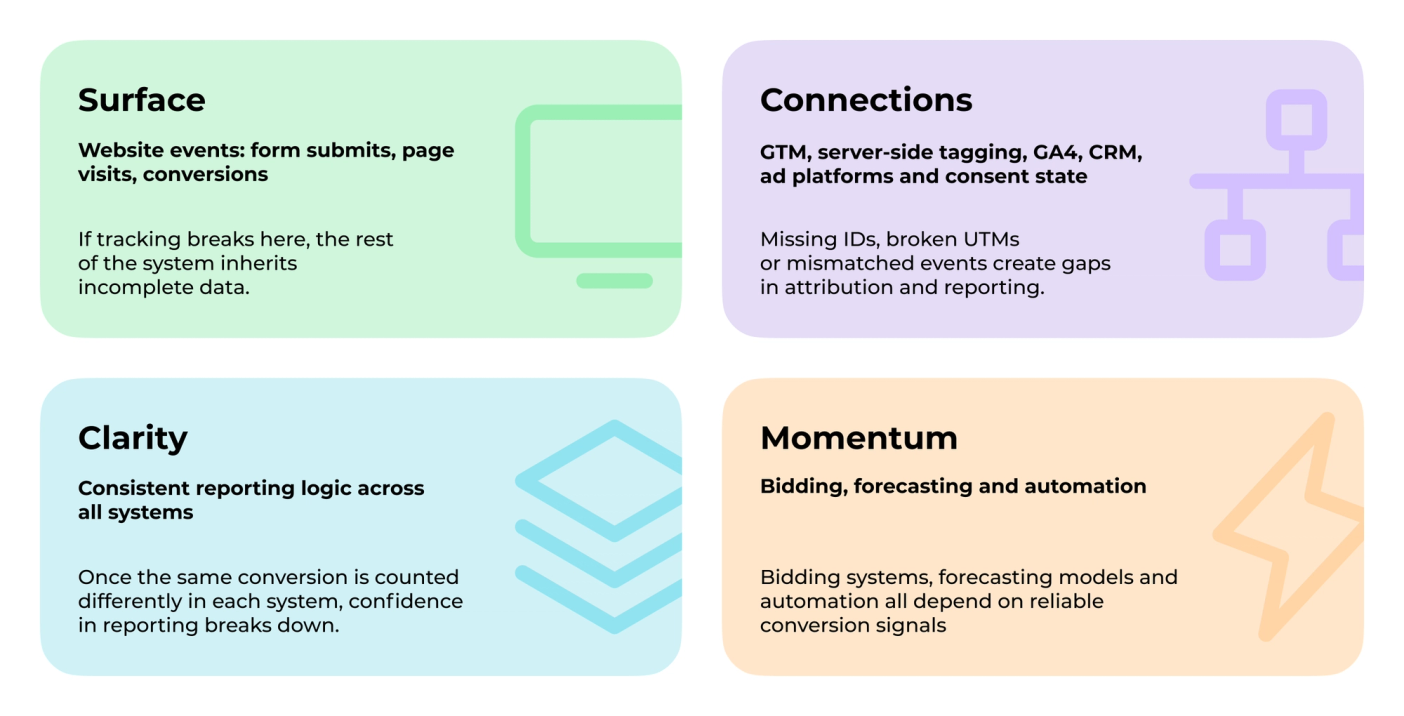
In Darwin Flux, tracking reliability is treated as a connected system:
1. Surface. The website is where the first signal appears. Form submissions, page visits and conversion events become the starting point for reporting and attribution. If tracking breaks here, the rest of the system inherits incomplete data.
2. Connections. Data needs to move consistently between GA4, CRM, ad platforms and reporting tools. Missing IDs, broken UTMs, delayed syncing or mismatched events create gaps that show up in attribution and reporting.
3. Clarity. Teams need reporting logic that stays consistent across GA4, CRM and ad platforms. Once the same conversion is counted differently in each system, confidence in reporting starts to break down.
4. Momentum. Reliable data supports optimization. Bidding systems, forecasting models, automation and budget decisions all depend on whether the underlying conversion signals remain accurate over time.
When these layers fall out of sync, teams start seeing different numbers in GA4, CRM and ad platforms even when tracking itself appears to work correctly.
The 2026 Tracking Reliability Problem
The question in 2026 is whether the signal that leaves your website reaches reporting intact. Consent enforcement, server-side tagging, offline conversion imports, CRM feedback loops and AI bidding trained on incomplete events all depend on how well tracking is configured at the source.
Where Client-Side Signal Breaks
Client-side tracking faces a numbers problem. Approximately 1.77 billion internet users now run ad-blocking tools. That is one in three visitors to your site. When someone blocks your Meta pixel or Google tag, that conversion disappears from your reports. Overall reliability is often benchmarked in the 70-80% range, though the actual number depends on traffic mix, consent rates and browser distribution.
Browser Privacy and the 2026 Signal Environment
Safari’s Intelligent Tracking Prevention caps first-party cookies at 7 days and blocks all third-party cookies by default. Firefox isolates cookies so they cannot be read cross-site. Chrome holds about 65% of global market share and changed course on full third-party cookie deprecation, but Safari, Firefox, ad blockers, consent loss and iOS privacy still make browser-only tracking fragile.
When iOS introduced App Tracking Transparency (ATT), opt-in rates dropped to 27%. A large share of iOS users opt out of app tracking, which weakens platform attribution signals, especially for ad platforms that rely on deterministic user-level matching. Buyers research in private groups, read reviews in unmonitored forums and hear about products through channels that never register in an attribution model. The revenue is real. The signal is not.
How Each Method Handles GA4 Data Collection
The two approaches differ at a fundamental level: where data processing happens, who controls it and what can interrupt it.
Client-Side Tracking: Browser Context
When someone visits your site, JavaScript runs directly in their browser. Tracking scripts collect page behavior: what pages they visit, what buttons they click, how long they stay. The data flows straight from the browser to platforms like Google Analytics, Facebook or your marketing automation tools.
Client-side tagging excels at capturing browser-specific information that is hard to get any other way: cookies, UTMs, referrer data, user agent, page URL, screen and device context and session behavior. This contextual richness makes it valuable for understanding who users are and where they came from. Client-side should not be removed. It should not carry revenue reporting alone.
Server-Side Tracking: Signal Delivery and Enrichment
Server-side tracking routes interaction data to your own server first. That server receives the raw information, processes it and forwards relevant data to Google Analytics or ad platforms. The browser still sends basic interaction data, but your server decides what gets shared, when and in what format.
“The main reason [for using server-side] is that this way you can incorporate the server-side data collection endpoint that you own in your first-party domain namespace... This becomes significant when you consider things like Intelligent Tracking Prevention.” – Simo Ahava, Co-Founder, Simmer; Google Developer Expert in Google Analytics & Google Tag Manager
What Server-Side Tracking Changes
The difference extends past data accuracy. It is what you can do with the data before it reaches any platform:
- GA4 Client ID stored with the lead: connects web session to CRM record.
- UTMs passed into CRM hidden fields: preserves source attribution through the pipeline.
- SQL, opportunity and closed-won events sent back to Google Ads or Meta: trains bidding on actual revenue, not form fills.
- Consent state checked server-side before forwarding events: respects user preferences while only forwarding the signal that consent rules allow.
- Bot and spam filtering before events reach reporting: cleans data at the source, not after the fact.
First-Party vs Third-Party Cookie Storage
First-party cookies come from the website you are visiting and stay tied to that domain. Third-party cookies get created by external domains through embedded content like ads or social plugins. Browser makers now treat these very differently. Server-side tracking tools can create first-party cookies on your backend that may last longer than browser-generated ones, though browser rules like Safari ITP and CNAME-cloaking protections can still limit persistence depending on browser, consent state and implementation.
Data Transformation Capabilities
On the server, you can enrich events with CRM data, validate information before transmission, apply privacy controls, filter out bot traffic, remove personally identifiable information (PII) and add custom parameters from your database. As Simo Ahava documents, server-side transformations let you intercept, modify or completely reshape what gets sent to each platform.
Client-side tracking sends whatever the browser captures, with limited ability to modify data in flight.
Need to understand where your GA4 data is breaking? Darwin audits tracking architecture and identifies the gaps before you scale.
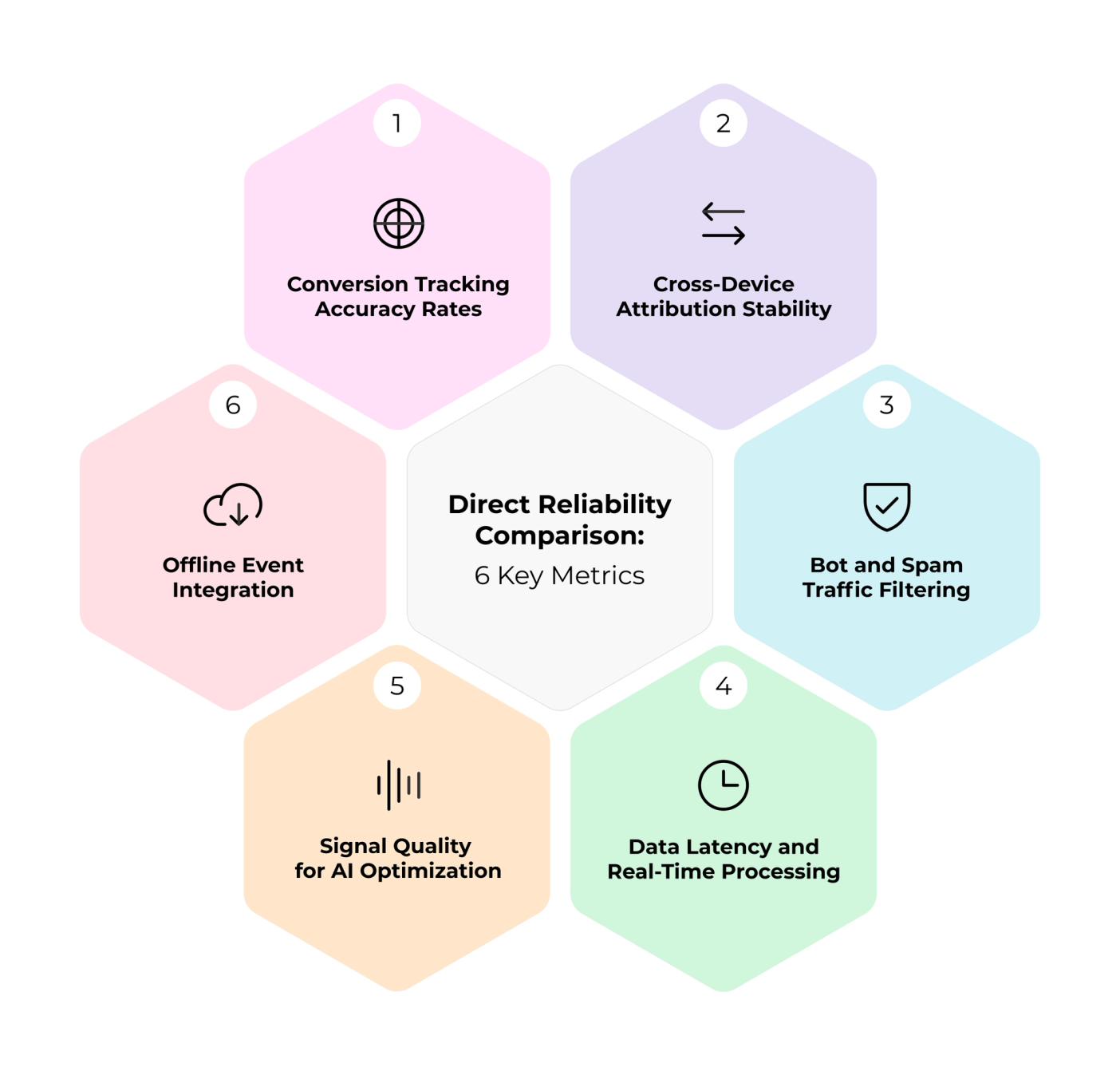
Direct Reliability Comparison: 6 Key Metrics
The gap between client-side and server-side tracking shows up in measurable outcomes that affect reporting accuracy, bidding quality and budget decisions.
1. Conversion Tracking Accuracy Rates
Client-side tracking accuracy is often benchmarked in the 70-80% range in browser-dependent setups, though the actual number depends on consent rates, browser mix and implementation quality. Server-side implementations can improve match quality significantly in well-configured setups. In affected setups, browser restrictions can account for 20-40% of attribution data loss.
Square saw a 46% increase in reported Google Ads conversions after deploying server-side tracking. ROI Assist, a digital marketing agency, watched their Facebook Ads accuracy jump from 60% to 93.65%. A skincare e-commerce brand recorded 4,512 GA4 purchases with server-side conversion tracking, up from just 1,724 with client-side tagging alone. Their Google Ads cost per purchase dropped 39% in the first month.
2. Cross-Device Attribution Stability
The average buyer now uses 3-4 devices before converting. Client-side tagging struggles here because cookies cannot transfer between laptop, phone and tablet. Deterministic matching through server-side methods achieves 80-90% accuracy when users authenticate on multiple devices.
3. Bot and Spam Traffic Filtering
Server-side tracking tools operate outside the browser, making them more resilient against spam traffic. Bot detection systems can score each request from 0 to 100 and automatically block anything above 75. Client-side tracking has no built-in defense. Bots fire your pixels, inflate your metrics and skew your A/B test results.
4. Data Latency and Real-Time Processing
GA4 processes data in 24-48 hour windows for complete reporting. Real-time reports only show the last 30 minutes of activity. Offline events can take up to 72 hours to appear. Server-side gives you more control over queueing, retries and event validation before data reaches GA4, but GA4 reporting latency still applies.
5. Signal Quality for AI Optimization
When iOS conversions go unreported, ad algorithms receive weaker signals about which iOS users are valuable. Server-side tracking can recover some conversion signals when consent permits and browser-side scripts are blocked, giving platforms cleaner optimization inputs over time.
“If they run more paid ads and data accuracy/richness is more important to them, then [server-side GTM] is the way to go.” – Julius Fedorovicius, Founder, Analytics Mania
6. Offline Event Integration
In-store purchases, phone call conversions and CRM lead submissions happen outside your website entirely. Server-side tracking connects these offline events to your digital attribution through Measurement Protocol API, creating a unified customer journey picture that client-side tagging cannot match.
Technical Trade-Offs and Real Costs
Choosing between client-side and server-side tracking is both a data quality decision and an infrastructure decision. Understanding the real costs helps teams build a credible case internally.
Infrastructure Requirements for Server-Side
Google Cloud Platform charges a minimum of $120/month for a production setup with three servers. Traffic spikes can push that to $240-$300/month as Google auto-scales. Managed hosting through Stape starts at $20/month for comparable setups, though costs climb with request volume. Most implementations land between 3-7 EUR per 1 million requests.
CPU usage drives 40-70% of total costs. Request fees stay predictable at roughly $0.40 per million requests, but what you do per request matters more than volume alone.
Client-Side Speed vs Server-Side Control
Client-side tagging wins on deployment speed. You paste JavaScript into your site and start collecting data immediately. Server-side setups require technical expertise: rewriting tracking scripts, managing data flows and coordinating between marketing and development teams. Custom implementations require 40-80 hours of developer time for initial setup.
That investment buys you control over what gets shared, when and with which platforms. It also buys cleaner data before it reaches reporting.
When Client-Side Tracking Is Still Sufficient
Not every situation warrants server-side infrastructure. Client-side tracking is a reasonable choice for directional analytics, early-stage setups and teams with limited engineering resources. If you need browser-specific context like UTM parameters and referrer data without a server container, client-side works well. The question is whether signal loss from ad blockers is affecting budget decisions you make.
Server-Side Tracking Tools: Managed vs Self-Hosted
Managed platforms like Stape and Elevar handle infrastructure, maintenance and updates automatically. Self-hosted setups using Google Tag Manager (GTM) server-side give you complete control but require DevOps expertise. You are responsible for monitoring, scaling and troubleshooting in real time. Managed options cost more monthly but eliminate developer overhead. The right choice depends on your team’s technical capacity and how much ongoing maintenance you can absorb.
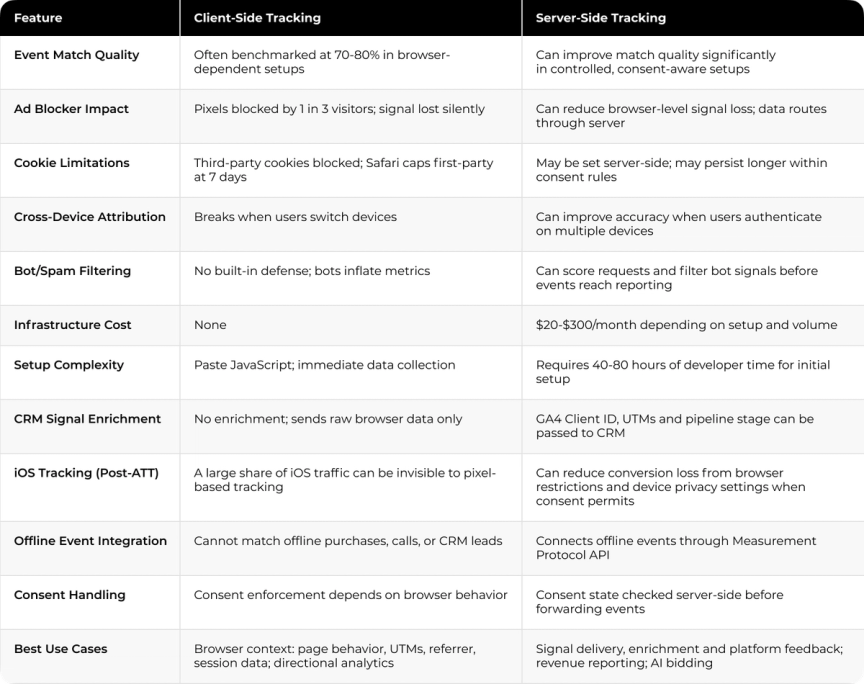
Client-Side vs Server-Side Tracking: Side-by-Side Comparison
Your GA4 numbers do not match your CRM and you are not sure where the gap is. Darwin identifies where data breaks and builds a tracking architecture that holds together.
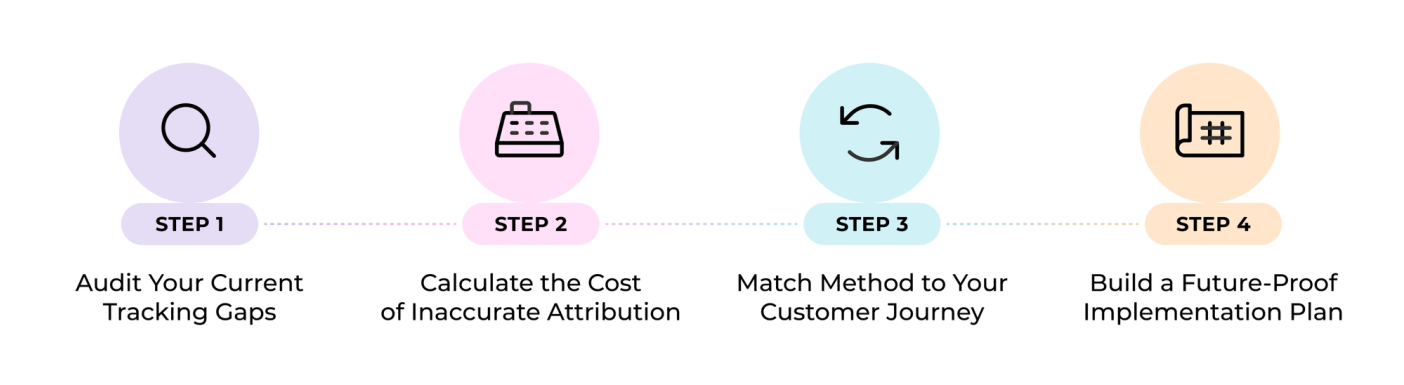
Decision Framework: Choosing the Right GA4 Tracking Strategy
Choosing a tracking setup starts with measurement. The right architecture depends on where your data breaks, what your customer journey looks like and whether your team has the capacity to maintain what gets built.
Audit Your Current Tracking Gaps
Quarterly audits are the recommended minimum, covering event tracking accuracy, custom dimension health, consent configuration and data retention settings. Check for conversion mismatches between GA4 and your CRM or payment processor. Watch for unexplained spikes in direct traffic, which signal missing UTM parameters or broken attribution.
A 10-15% discrepancy between GA4 and other platforms is normal. Patterns that grow over time, or gaps that appear after a browser update, are the ones worth investigating.
Calculate the Cost of Inaccurate Attribution
Misattribution drains budget through misallocated spend and scaled campaigns that recycle existing customer revenue. Companies following measurement-first approaches see 34% improvements in marketing return on investment (ROI) and 28% reductions in customer acquisition costs (CAC). The question to answer: what does incomplete data cost you monthly in wasted spend?
Match Method to Your Customer Journey
Consider three dimensions: your analytics objective, available engineering resources and the privacy behavior of your target users. Choose server-side tracking when you lack control over data sent to third parties, when marketing results are declining due to data quality issues or when ad blockers affect a significant share of your traffic. Ad blockers now affect roughly 30% of web traffic in many markets.
Build a Future-Proof Implementation Plan
81% of GA4 projects fail due to misconfigured events and tracking gaps. Start with measurement objectives before touching technical setup. Define what success looks like, identify who needs the data and determine what actions different scenarios should trigger. The tracking method is only part of the equation. If data flows without a unified architecture, even a well-configured server-side setup will produce numbers that do not match in GA4, CRM and ad platforms.
How Darwin Aligns GA4 Data Across Systems
Measurement fails when tracking, attribution and reporting logic drift apart. Darwin starts by mapping where the signal breaks, then rebuilds the system so the same conversion logic supports reporting, budget decisions and automation.
When Cleo’s marketing team struggled with fragmented reporting in GA4, BigQuery and Salesforce, Darwin built a custom cookie-based analytics connector that unified the data into one reporting hub. The setup helped Cleo eliminate third-party attribution tools, save $50K annually, cut two days of manual reporting each month and improve reporting accuracy from roughly 70% to 90%.
In Darwin Flux, this is the Connections layer doing its job: protecting the signal created on the website so Clarity can support reporting, pipeline analysis and budget decisions.
Reliable tracking starts with the first website signal: form submit, page visit or conversion event. The real test is whether that signal reaches GA4, CRM, ad platforms and reporting tools without changing meaning. When the same event logic supports dashboards, revenue forecasting and budget decisions, teams can use it to improve bidding and automation.
Your revenue signal exists. Darwin makes sure it reaches the systems that act on it.
FAQs
Q1. Why does server-side tracking matter for revenue reporting in 2026?
Browser privacy changes have broken the assumption that pixel-based tracking captures what happens. Client-side methods can miss a significant share of conversion data in affected setups. Server-side can reduce browser-level signal loss by processing data on controlled infrastructure and sending stronger, enriched signals back to GA4 and ad platforms when consent rules allow.
Q2. Does server-side tracking replace client-side, or do they work together?
They work together. Client-side captures browser context: page behavior, UTMs, referrer data and session information. Server-side handles signal delivery, CRM enrichment, consent enforcement and platform feedback. A hybrid setup gives you both. Neither alone is sufficient for reliable revenue reporting.
Q3. What are the main costs of implementing server-side tracking?
Infrastructure runs $20-$300/month. Google Cloud Platform starts at $120/month for production; managed hosting through Stape from $20/month. Initial setup requires 40-80 hours of developer time. For teams spending $10K+ on paid ads, improved signal quality can justify the cost through better bidding and cleaner attribution.
Q4. How does server-side tracking improve AI bidding?
Ad platform algorithms train on the conversion signals you send. When iOS or ad-blocked conversions go unreported, the algorithm receives incomplete conversion data for those users. Server-side tracking can recover some of those signals when consent permits, giving bidding systems cleaner data to optimize against.
Q5. When is client-side tracking still sufficient?
Client-side works for directional analytics, early-stage setups and teams with limited engineering resources. If your attribution needs are straightforward and signal loss from ad blockers has not affected budget decisions, it is a reasonable starting point. Evaluate server-side when running active paid campaigns, closing high-value deals with long sales cycles or feeding revenue data back into ad platforms.
 Sergey Kisly