Quick Answer:
The best data privacy tools for SaaS marketing teams in 2026 range from free cookie consent managers like CookieYes to enterprise platforms like OneTrust and Transcend.
Your choice depends on team size, budget, and how many systems hold customer records.
This guide covers 13 tools with verified pricing, use cases and key tradeoffs for each.
TL;DR
- Ketch. For mid-market teams needing consent management without engineering support.
- OneTrust. For enterprise programs managing multiple jurisdictions.
- Usercentrics. For Google Ads compliance and multi-language European markets.
- DataGrail. For automated DSAR workflows with AI-driven execution.
- Transcend. For enterprise teams needing encrypted, infrastructure-level privacy.
- BigID. For large teams managing distributed cloud and on-premises records.
- CookieYes. For smaller teams needing fast, low-cost cookie compliance.
- Osano. For teams that want a financial guarantee against regulatory fines.
- TrustArc. For enterprise teams wanting AI-assisted compliance with guided implementation.
- Enzuzo. For e-commerce and agency teams needing Google CMP Gold at SMB pricing.
- CookieFirst. For European teams needing simple Google-certified consent management.
- Securiti. For global teams needing cross-jurisdiction consent rules automation.
- Complianz. For WordPress-based teams that keep all records on their own server.
SaaS marketing teams manage customer records across websites, apps and third-party tools. Consent settings affect tracking, attribution, and how data moves between systems.
The right privacy tool helps you keep data usable while meeting legal compliance requirements. This guide breaks down 13 tools SaaS marketing teams use in 2026, with pricing, use cases, and tradeoffs for each.
1. Ketch

Ketch is a privacy platform designed for marketing teams that need control over consent, identity, and how data moves across systems. It fits teams managing high traffic and multiple data sources.
What Does Ketch Do for Privacy Compliance?
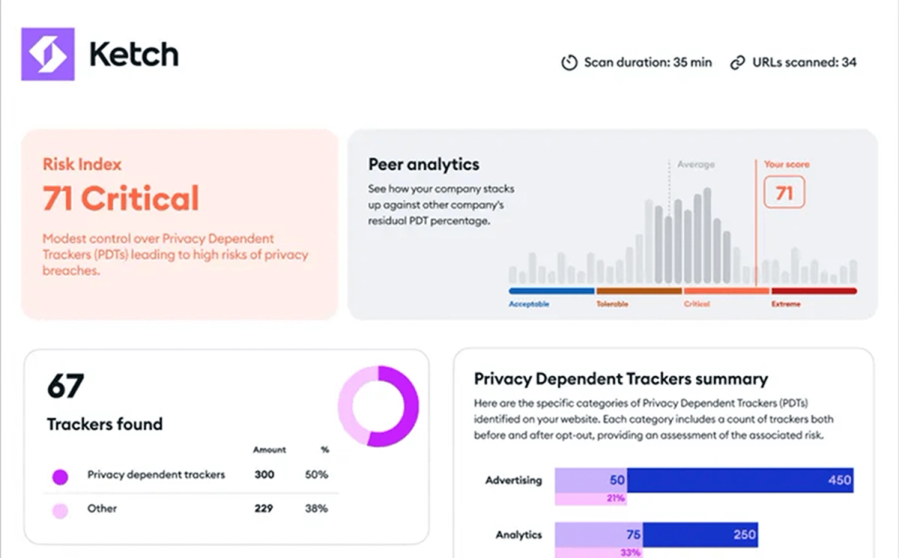
Ketch focuses on controlling consent and identity across systems in real time.
Recognized as a Leader in the IDC MarketScape for Worldwide Data Privacy Management Software in 2025, the platform is used by teams managing substantial web traffic.
Its identity resolution capability connects user identifiers across browsers, devices, and platforms into a unified identity graph. This allows teams to enforce privacy choices wherever personal data is stored, from websites to cloud systems and AI tools.
The platform includes 350+ integrations such as Salesforce, HubSpot, Google Analytics, AWS, and Snowflake. It processes data in the background to avoid slowing down site performance.
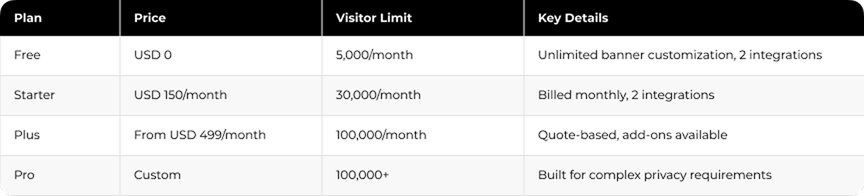
Ketch Pricing and Plans
Ketch Pros and Cons
Pros:
- No coding needed for most workflows
- Flexible setup for banners and consent preferences
- Strong identity matching across systems
- Can be launched in a few weeks
- Support available via email, phone, and Slack
Cons:
- Advanced features take time to learn
- Each domain needs separate setup, which slows multi-site rollout
Who Should Use Ketch?
Ketch fits mid-market and enterprise SaaS companies that manage significant web traffic and need privacy compliance without affecting site performance.
Marketing teams can collect zero-party data and use it across their martech stack while keeping consent signals synchronized and under control.
2. OneTrust

OneTrust is an enterprise privacy platform used by SaaS marketing teams that operate across multiple regions and need centralized control over consent, risk, and compliance workflows.
What Does OneTrust Do for Enterprise Privacy Management?
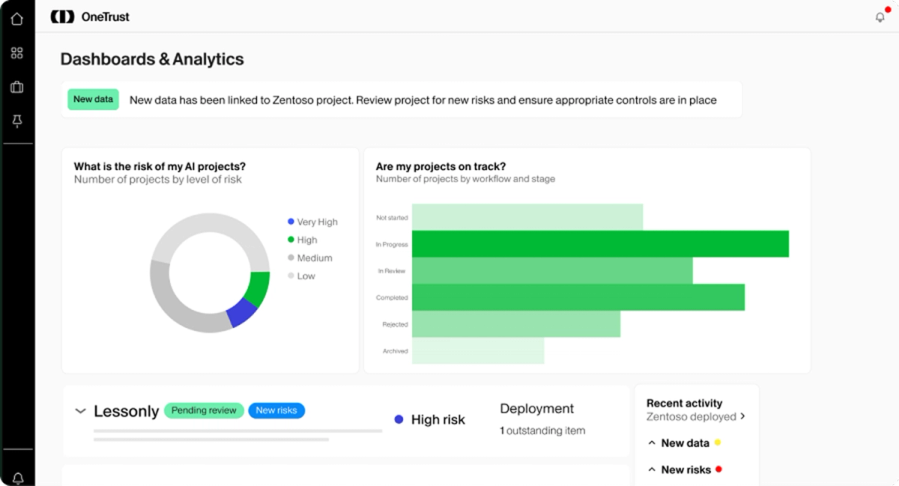
OneTrust serves over 14,000 customers worldwide, including more than half of the Fortune 500. The Forrester Wave for Privacy Management Software in Q4 2025 named it a Leader with top scores in 22 criteria.
The platform is structured into five product lines that teams can combine based on their setup: Consent and Preferences, Privacy Automation, Third-Party Management, Tech Risk and Compliance, and AI Governance.
OneTrust captures consent across web, mobile, and connected TV, then syncs that data into systems like Salesforce and HubSpot. Teams can A/B test consent banners, improve opt-in rates, and build customer profiles that support personalization.
It classifies over 45 million cookies and detects trackers across digital properties in real time.
OneTrust Pricing and Plans
OneTrust uses custom pricing. The median buyer pays around USD 11,500 per year, based on Vendr data.
Entry pricing starts near USD 1,620 per year, while enterprise setups can reach USD 42,534 or higher. Consent and Preference Essentials for a single domain costs around USD 827 per month, and the Privacy Essentials Suite starts at USD 3,680 per month.
From Q2 2026, OneTrust requires a USD 10,000 minimum annual commitment. Implementation fees can add USD 10,000 to USD 50,000 in the first year.
OneTrust Pros and Cons
Pros:
- Strong coverage for enterprise privacy and compliance workflows
- Automation reduces manual work for privacy teams
- Broad functionality across consent, risk, and governance
- Suitable for multi-region operations
Cons:
- High cost for smaller teams
- Interface and reporting can feel outdated
- Requires time to onboard and configure
Who Should Use OneTrust?
OneTrust fits enterprise SaaS companies running privacy programs across multiple regions and regulatory environments.
It works best for teams with dedicated legal and privacy functions that need to manage consent, risk, and data governance across multiple systems and properties.
3. Usercentrics

Usercentrics is a Google-certified CMP used by SaaS marketing teams that rely on Google Ads and need to meet consent requirements in the EU and other regulated markets.
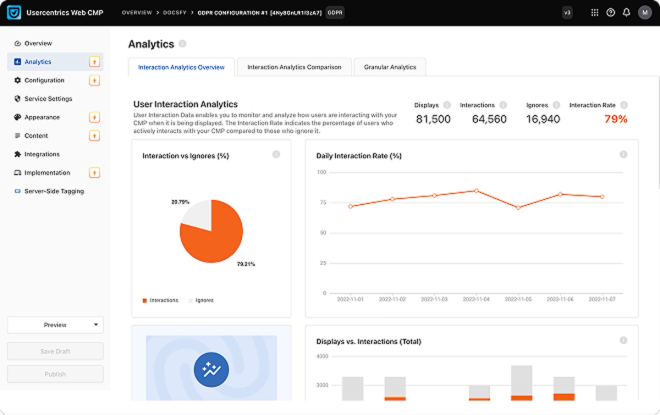
What Does Usercentrics Do for Google Ads Compliance?
Usercentrics is a Google-certified CMP that supports Consent Mode v2, required for running ads in the EU. Based in Munich, it merged with Cybot (Cookiebot) in 2021 and expanded globally.
The platform supports TCF 2.2 and integrates with tools like Google Tag Manager. It helps teams meet Google requirements for AdSense, Ad Manager, and AdMob when serving ads to EEA and UK users.
Usercentrics includes 2,200+ legal templates for consent frameworks. Its scanner detects cookies and trackers, then categorizes them automatically. Teams can test different banner versions to improve opt-in rates.
Usercentrics Pricing and Plans
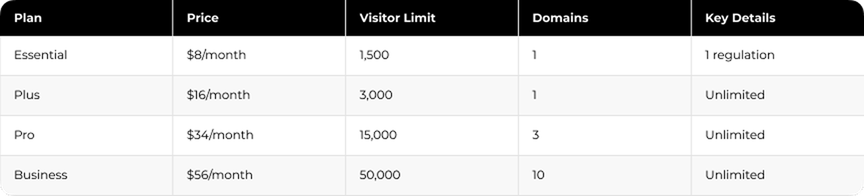
The Business plan scales from 50,000 to 1 million sessions per month. Usercentrics offers a 14-day free trial with full feature access.
Usercentrics Pros and Cons
- Built for Google Ads compliance (Consent Mode v2, TCF 2.2)
- Supports 60+ languages with automatic translation
- Strong GDPR alignment with ISO 27001 certification
- Flexible setup based on user location
Cons:
- Pricing can be higher than some alternatives
- Interface uses technical terms that may require onboarding
Who Should Use Usercentrics?
Usercentrics fits SaaS marketing teams that depend on Google Ads and need to meet consent requirements across European and global markets.
It works well for teams managing multi-language websites and running campaigns in regions with strict privacy regulations.
4. DataGrail

DataGrail is a privacy platform built for SaaS marketing and operations teams that need to automate DSAR requests and manage privacy workflows across multiple systems.
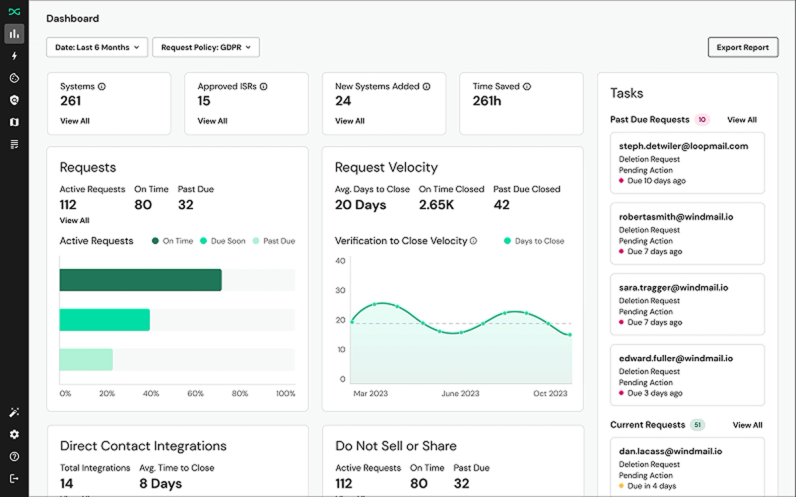
What Does DataGrail Do for Data Subject Request (DSAR) Automation?
DataGrail uses AI to automate data subject requests (DSARs) and related privacy operations without constant manual work. Its Vera AI engine supports over 20 privacy laws and monitors risk across 22,000+ systems.
The platform connects to 2,500+ integrations, including HubSpot, Snowflake, and internal databases. Smart Verification confirms user identities using existing records, which helps reduce manual checks.
It detects user location to trigger the correct consent banners and integrates with Google Tag Manager. DataGrail focuses on automating data subject requests across connected systems.
DataGrail Pricing and Plans
DataGrail uses custom pricing.
Mid-market deployments handling 1M-5M users typically cost USD 40,000 to USD 90,000 per year. Smaller companies with under 1M users and fewer than 500 annual DSAR requests pay around USD 30,000 to USD 60,000 per year.
Consent management adds 30-50% to the base platform cost. Implementation fees range from USD 10,000 to USD 40,000. Enterprise deployments with multiple modules can exceed USD 150,000 per year.
DataGrail Pros and Cons
Pros:
- Strong automation for DSAR processing
- Reduces manual work for privacy teams
- Broad integrations across marketing and data systems
- High customer satisfaction and retention
Cons:
- Limited flexibility in some customization areas
- Integration setup can require additional effort
- Some workflows still need manual handling
Who Should Use DataGrail?
DataGrail fits SaaS marketing and operations teams that handle frequent data subject requests and need a single system to manage privacy workflows.
It works well for teams looking to reduce manual processing and keep request handling structured and consistent as volume grows.
5. Transcend

Transcend is a privacy platform built for SaaS companies that need to enforce consent and data access rules directly inside their systems, not through external layers or manual processes.
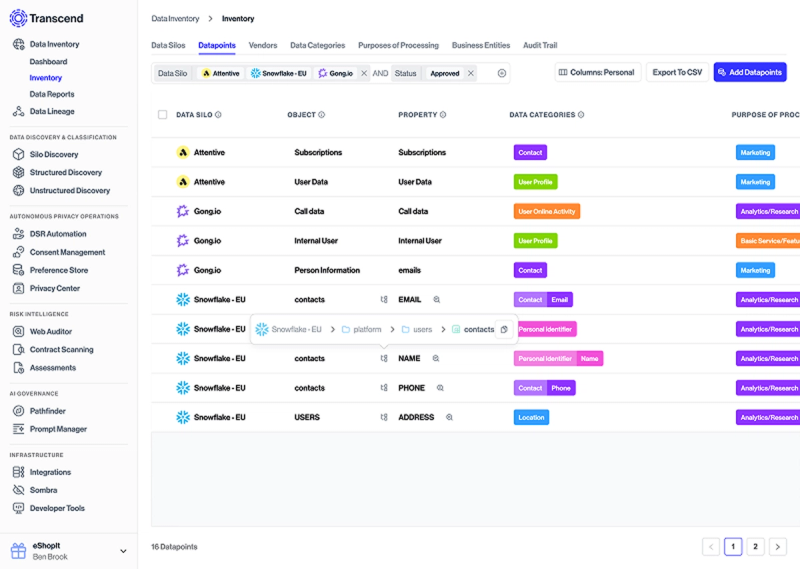
What Does Transcend Do for Infrastructure-Level Privacy?
The platform connects to 220+ systems through native integrations. It supports databases, CDPs, CRMs, marketing automation platforms, and AI tools without requiring custom code.
Its Sombra gateway encrypts personal data before it leaves your infrastructure. Transcend does not access API keys and cannot decrypt stored data.
Transcend Pricing and Plans
Transcend uses custom pricing.
Starting cost is around USD 10,000 per year. The median buyer pays USD 87,418 annually, based on Vendr data. Enterprise deployments with multiple modules cost more.
Implementation takes longer than mid-market tools due to system-level integration.
Transcend Pros and Cons
Pros:
- Reduces manual compliance work by up to 70%
- Handles most requests without human intervention
- Applies privacy rules directly inside infrastructure
- Strong fit for complex system environments
Cons:
- Setup requires time and technical involvement
- Implementation takes longer than simpler tools
- Documentation can be limited for newer modules
Who Should Use Transcend?
Transcend fits enterprise SaaS teams that operate complex system environments and need privacy rules applied directly where data is stored and processed.
It works well for companies that want to move from surface-level consent tools to infrastructure-level privacy enforcement.
6. BigID

BigID is a data discovery and privacy platform built for enterprise SaaS companies that need visibility into where sensitive data is stored and how it is used.
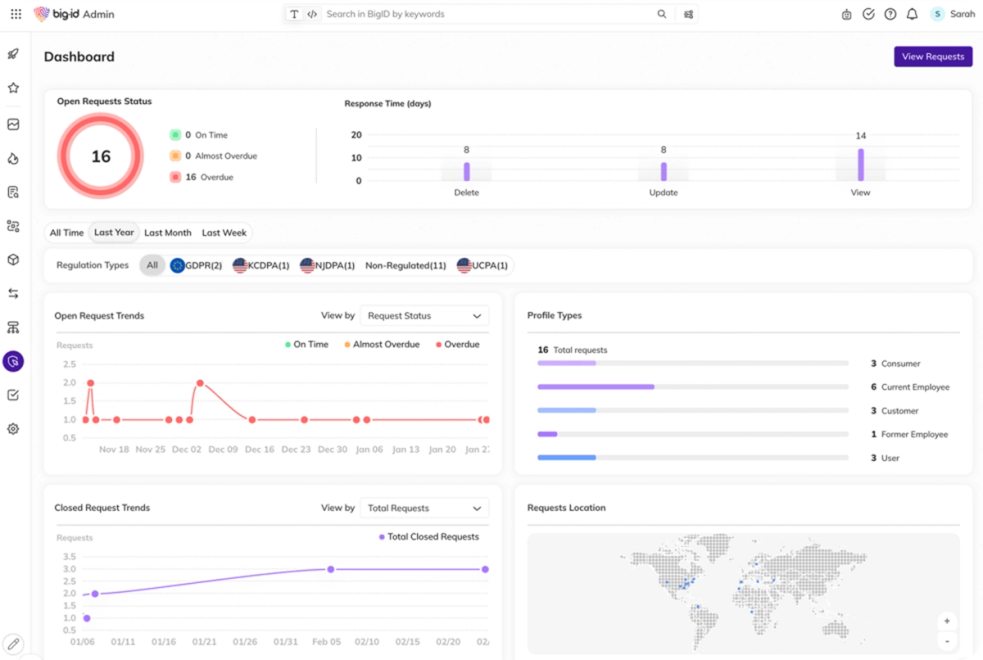
What Does BigID Do for Enterprise-Scale Data Discovery?
BigID was one of the first enterprise platforms to combine data security posture management, data loss prevention, access control, and privacy in one place. It is built for large organizations managing distributed records in cloud and on-premise environments.
AI classifiers support 100+ languages and identify personal, sensitive, and regulated data at high volume. The identity resolution engine links records without manual mapping.
Marketing teams use it to understand where customer data is stored, who has access to it, and whether consent applies to each use case.
BigID Pricing and Plans
BigID uses custom pricing and is typically higher than most tools in this category. Contact their sales team for a quote based on data volume and selected modules.
BigID Pros and Cons
Pros:
- AI classifiers support 100+ languages
- Strong identity resolution for large datasets
- Combines DSPM, DLP, access control, and privacy in one platform
Cons:
- High cost
- Interface can slow down under heavy load
- Support delays reported for new features
Who Should Use BigID?
BigID fits enterprise SaaS teams working with large volumes of data in cloud and on-premise environments who need clear visibility into sensitive data and access controls.
7. CookieYes

CookieYes is a Google-certified CMP used by SaaS teams that need a simple way to manage cookie consent and basic privacy requirements.
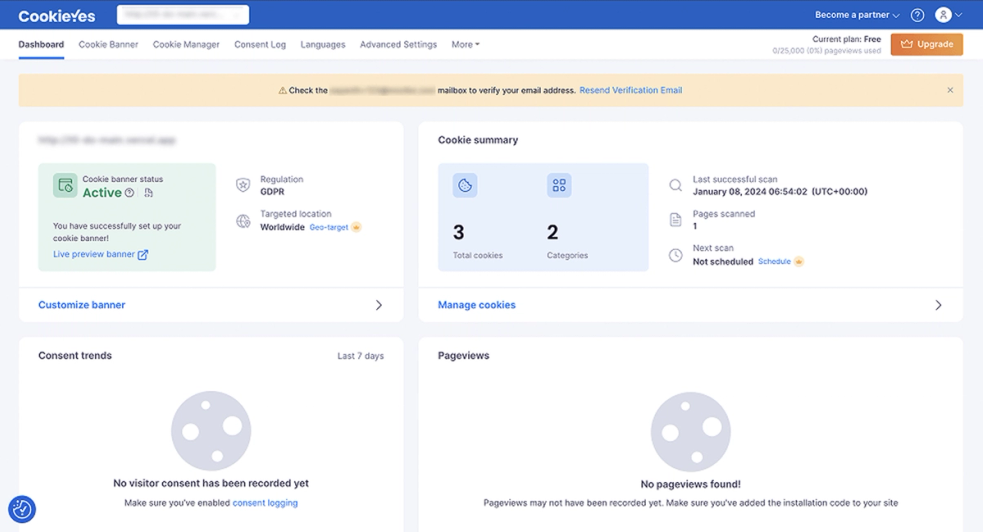
What Does CookieYes Do for Simple Cookie Compliance?
Used by over 1.5 million websites, CookieYes can be set up in about 10 minutes with a single line of code. It supports GDPR, CCPA, LGPD, and other major regulations with auto-blocking enabled by default.
The platform supports 170+ languages, runs regular cookie scans, and integrates with Google Tag Manager and Google Consent Mode v2. A consent log stores records with timestamps and consent IDs for audit purposes.
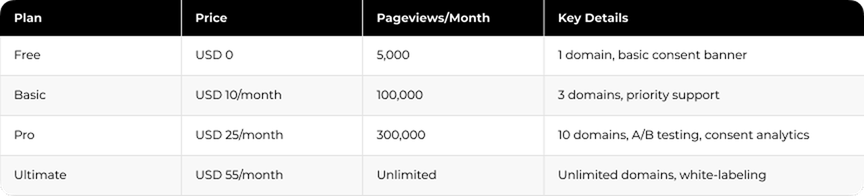
CookieYes Pricing and Plans
CookieYes Pros and Cons
Pros:
- Fast setup with one line of code
- Supports 170+ languages
- Auto-blocking enabled by default
- Free plan available for small teams
Cons:
- Free plan limited to 15,000 pageviews per month
- Scanner may miss scripts loaded through tag managers
Who Should Use CookieYes?
CookieYes fits smaller SaaS teams that need a quick way to implement cookie consent without involving engineering resources.
8. Osano

Osano provides a unified privacy platform covering cookies, email compliance, terms of service, marketing consent, and AI governance. It processes over 1 billion consents monthly and supports 95+ regulations in 40+ languages.
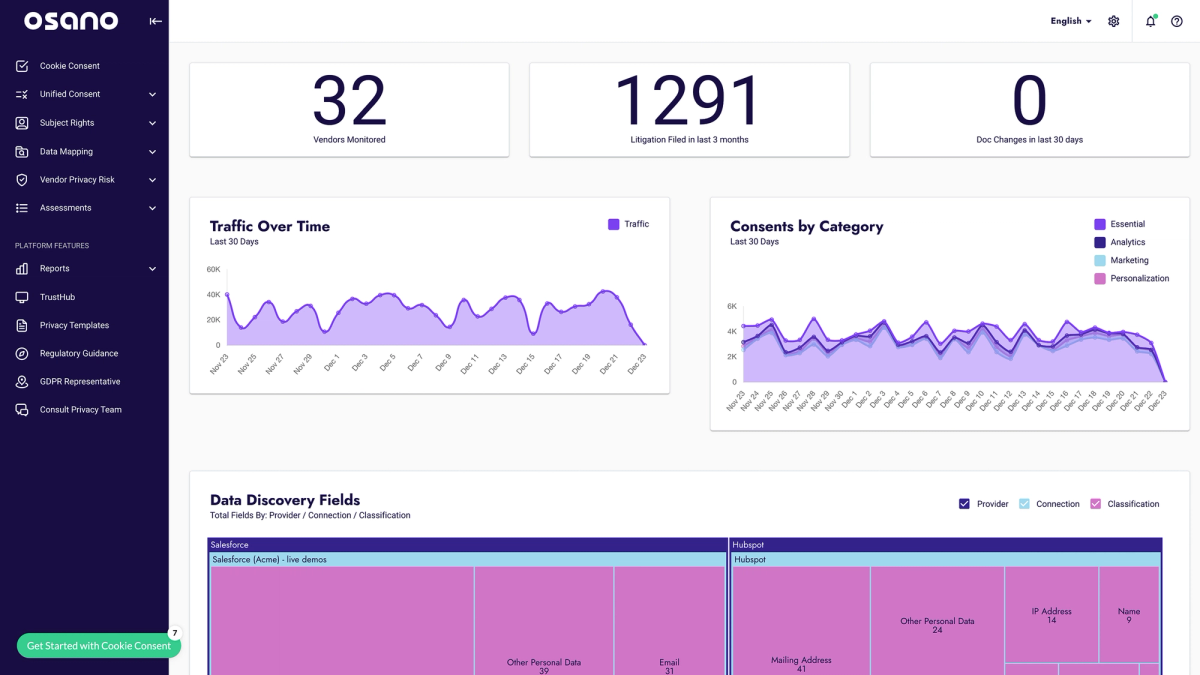
What Does Osano Do and What Is the No-Fines Guarantee?
Osano combines consent management with financial protection. The USD 500,000 “No Fines, No Penalties” coverage applies when the platform is configured according to its guidelines and a regulatory fine still occurs. This reduces compliance risk without adding separate legal processes.
Osano Pricing and Plans
Pricing is not publicly listed. As of 2026, Osano follows a sales-led model. The Plus tier previously started at USD 199/month billed annually. A free tier is available with limited functionality.
Osano Pros and Cons
Pros:
- Unified platform for cookies, email compliance, marketing, ToS, and AI governance
- Supports 95+ regulations and 40+ languages
- USD 500,000 financial coverage on qualifying tiers
Cons:
- Interface may require onboarding time
- Coverage applies only to higher tiers
- Pricing is not transparent
Best for SaaS Marketing Teams
Osano fits SaaS teams that need privacy management with built-in financial protection in one system.
9. TrustArc

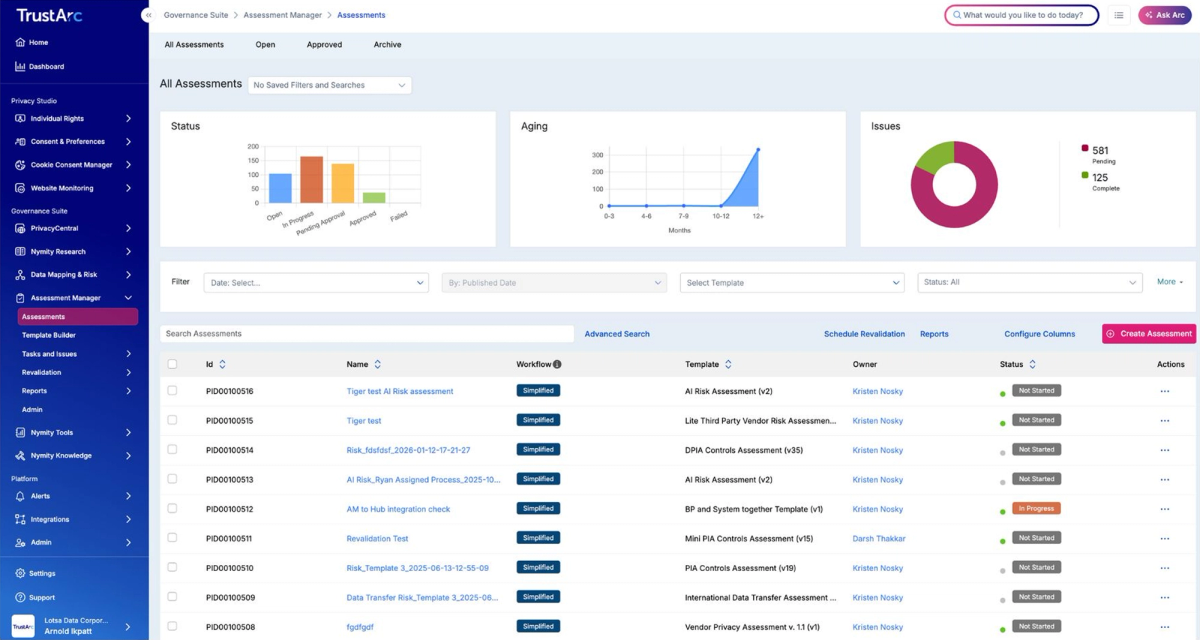
TrustArc provides a privacy compliance platform with AI-assisted guidance built on 28 years of industry expertise. Its Arc AI engine uses over 50,000 expert-written references updated daily to support implementation decisions.
What Does TrustArc Do for AI-Assisted Compliance?
The platform covers consent management, record mapping, privacy impact assessments, DSAR processing, and third-party risk. Marketing teams use it to automate compliance workflows while keeping legal teams aligned through built-in reporting.
Arc AI supports guided implementation, reducing the need for manual configuration and helping teams move faster with structured recommendations.
Integrations include Salesforce, Microsoft Dynamics, Zendesk, and other enterprise systems.
TrustArc Pricing and Plans
TrustArc starts at around USD 10,000 per year. Full pricing requires a sales consultation. Customers report a 35% decrease in compliance costs and an 80% reduction in privacy incidents after deployment.
TrustArc Pros and Cons
Pros:
- 28 years of experience in privacy compliance
- Arc AI uses 50,000+ expert references updated daily
- Guided implementation reduces configuration time
- Reported 35% reduction in compliance costs
Cons:
- Learning curve for advanced features
- Pricing requires a sales consultation
Who Should Use TrustArc?
TrustArc fits enterprise teams that need AI-assisted compliance with implementation guidance built into the platform.
10. Enzuzo

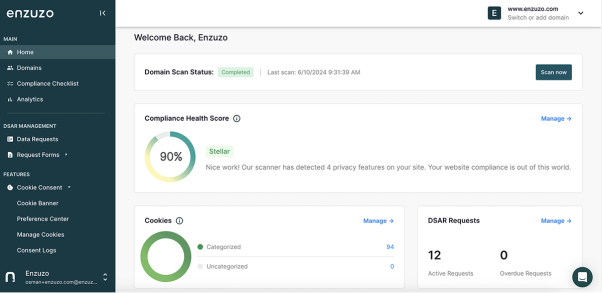
Enzuzo provides a Google CMP Gold Partner solution with consent management, privacy policy generation, and DSAR handling designed for e-commerce and agency teams. Deployment typically takes about one day, with automated policy updates reducing ongoing legal maintenance.
What Does Enzuzo Do for E-Commerce and Agency Teams?
Enzuzo supports consent management and privacy workflows tailored for online stores and agencies. It includes policy generation, DSAR handling, and tools aligned with Google Ads compliance requirements.
Setup takes about a day, allowing teams to implement compliance without long onboarding cycles. Automated updates keep policies aligned with regulatory changes over time.
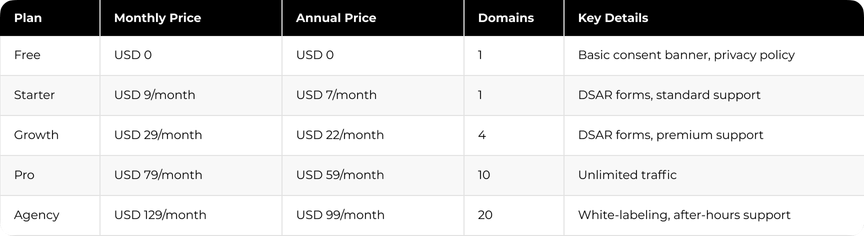
Enzuzo Pricing and Plans
Enzuzo Pros and Cons
Pros:
- Deployment in about one day
- Automated policy updates
- 4.3/5 rating on Shopify
- Google CMP Gold certification
Cons:
- Occasional lag during initial setup
- Limited granular cookie customization
Who Should Use Enzuzo?
Enzuzo works for e-commerce and agency-focused SaaS teams needing Google Ads compliance without enterprise budgets.
11. CookieFirst

CookieFirst provides a European Google-certified CMP partner solution with Google Consent Mode v2, TCF 2.2 support, and tools for Google Advertising Partners. It enables granular opt-in for specific cookie categories and vendors, with automated scans and consent tracking.
What Does CookieFirst Do for European Consent Compliance?
CookieFirst supports detailed consent collection aligned with European regulations. Granular opt-in settings allow control over cookie categories and individual vendors.
Monthly scans detect and categorize cookies automatically. The consent banner can be customized to match brand design, while built-in analytics show how users interact with consent prompts.
The platform supports 44+ languages with automatic translations and integrates with Google Tag Manager.
CookieFirst Pricing and Plans

CookieFirst Pros and Cons
Pros:
- Fast setup with plugins for WordPress, Shopify, and Shopware
- Competitive pricing for smaller companies
- European record storage
Cons:
- Pricing may be higher than alternatives for some users
- 250,000 pageview soft limit per domain
Who Should Use CookieFirst?
CookieFirst fits European-focused SaaS teams and smaller companies that need consent management aligned with Google Ads requirements.
12. Securiti

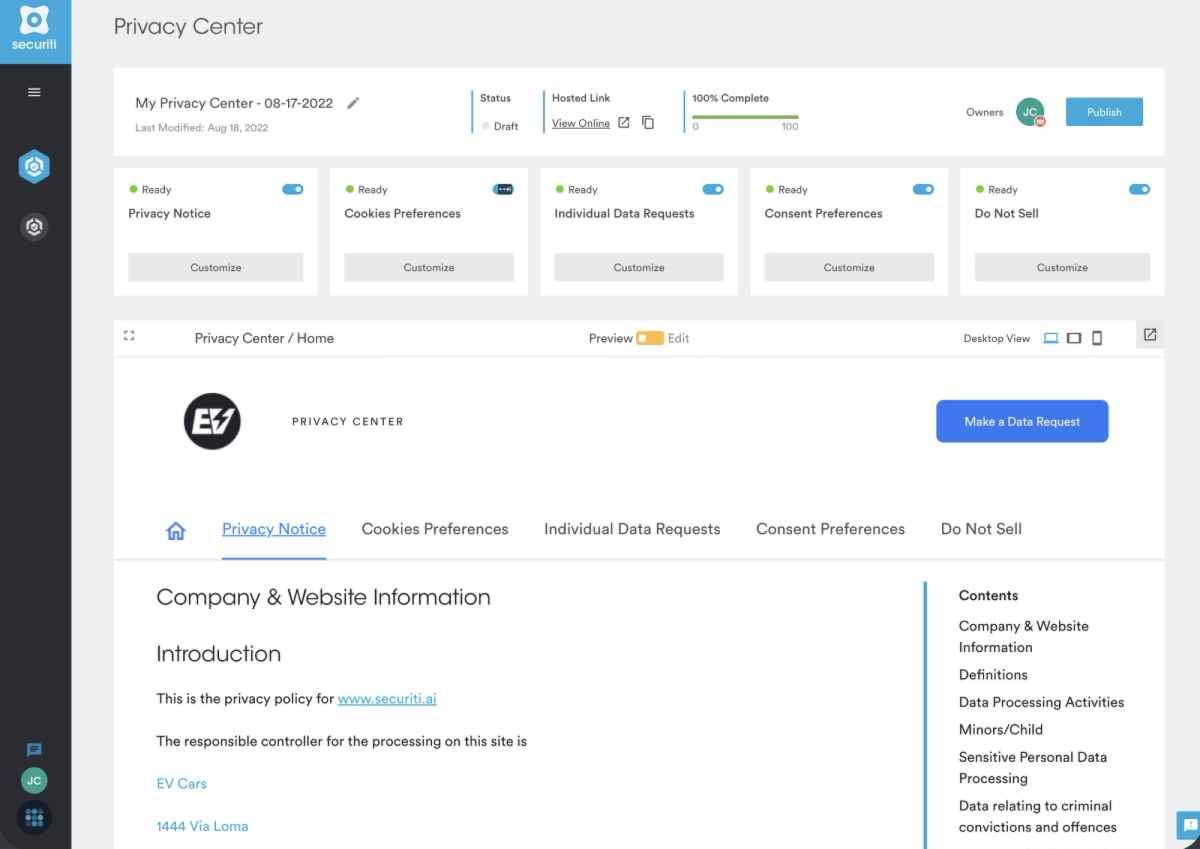
Securiti provides a Data Command Center platform for managing privacy and GenAI governance in one system. It is ranked #1 in Data Detection and Response and #2 in Privacy Management Software.
What Does Securiti Do for Multi-Jurisdiction Consent Automation?
The Rules Matrix drives consent automation across multiple jurisdictions. It applies consent status (Granted, Declined, Restricted) based on regional legal requirements.
The platform integrates with CRMs such as Salesforce and evaluates consent records to enforce correct status. It also includes AI-enabled record discovery, automated PII classification, and consent management across hybrid multicloud environments.
Integrations include AWS, Microsoft 365, Azure, and Salesforce.
Securiti Pricing and Plans
The median buyer pays around USD 41,841 per year. Pricing ranges from USD 4,160 to USD 74,174 depending on deployment scale. Capterra lists starting costs at USD 119.99 per feature per month.
Securiti Pros and Cons
Pros:
- 30–40% reduction in manual effort reported by customers
- Recognized as Gartner Cool Vendor, Forrester Privacy Management Wave Leader, and RSA Most Innovative Startup
Cons:
- PII classification accuracy may require improvement
- Technical support receives mixed feedback
- Scalability depends on deployment size
Who Should Use Securiti?
Securiti fits marketing teams managing global consent requirements who need automated enforcement across jurisdictions.
13. Complianz

Complianz provides a privacy solution for WordPress with over 1 million users. It covers cookie scanning, consent management, and legal document generation while keeping data stored on your own installation.
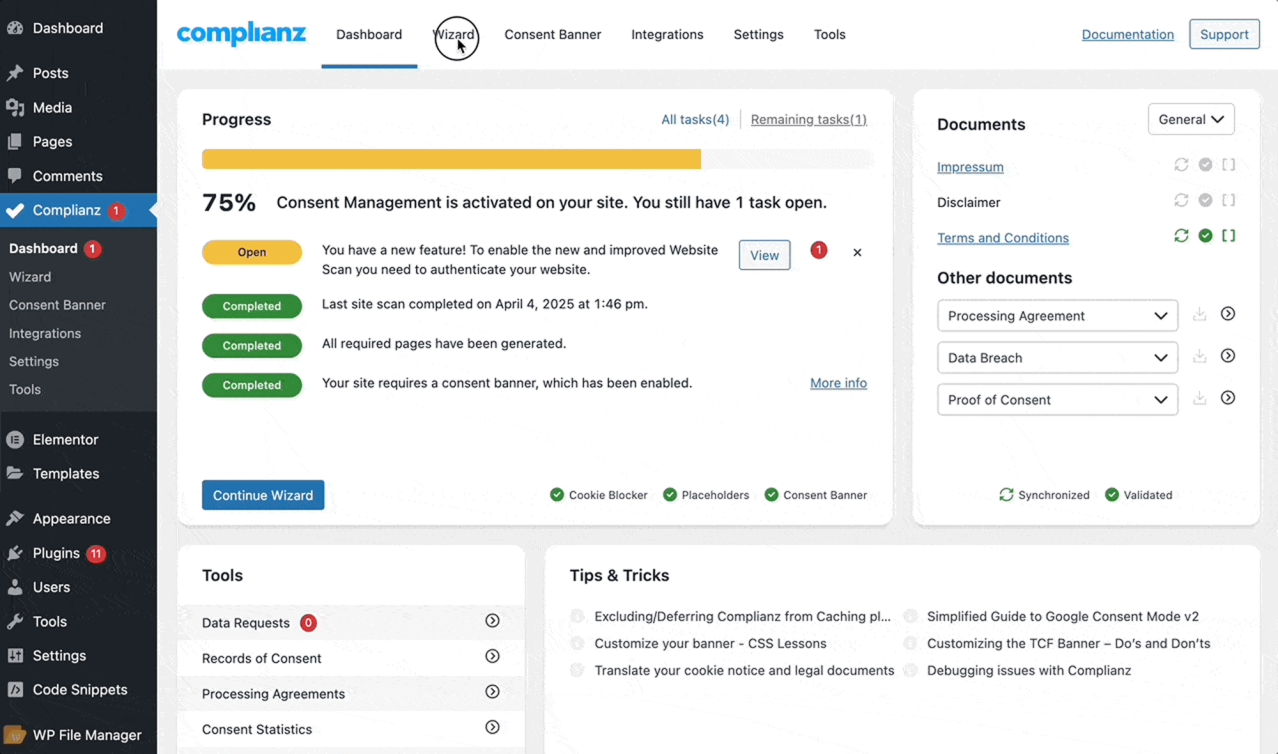
What Does Complianz Do for WordPress Privacy Compliance?
The plugin handles cookie detection, consent collection, and legal documentation in one workflow. All records remain on the WordPress site without external data transfers.
A setup wizard uses an automated scan to identify cookies and scripts across plugins and services. Settings can run in automated mode or be adjusted manually.
Support includes 47+ languages with geo-targeting that adapts banners and legal documents by region. It connects with common WordPress plugins through the Script Center. Monthly scans update the cookie policy as the site changes.
Complianz Pricing and Plans

The free version includes cookie banners and policies with a limit to one privacy law. Premium adds A/B testing, consent statistics, multi-region support, and Google Consent Mode v2.
Complianz Pros and Cons
Pros:
- Beginner-friendly setup wizard
- Same-day support resolution
- Free version suitable for small sites
- Data stored on your own server
Cons:
- Interface may feel clunky after initial setup
- Google Consent Mode v2 requires a premium plan
Who Should Use Complianz?
Complianz fits WordPress-based SaaS teams that need privacy tools with full control over where records are stored.
How to Choose the Right Data Privacy Software for Your SaaS Marketing Team
The right data privacy software should align with your tech stack, support multi-region consent requirements, automate DSAR workflows, and scale with your traffic and request volume without adding operational overhead.
Map Your Marketing Tech Stack Integrations First
Start with where personal records live. Your CRM holds contact profiles. Marketing automation platforms track behavior. Analytics tools capture interactions. Cloud storage contains customer files.
The solution you choose should connect natively to these tools without relying on custom API work. Platforms with 2,500+ integrations reduce engineering effort and speed up implementation. To see how Darwin approaches compliance integrations, check the Security and Compliance service page.
What Consent Management Capabilities Do You Need?
A consent platform should collect permissions, block unauthorized scripts, and maintain audit-ready records automatically.
Multi-jurisdiction support is critical. German visitors require opt-in before tracking. California users have opt-out rights. Geo-targeting handles these differences automatically without manual banner changes.
"Consumers need to be able to rely on the design and user interface of a service to quickly grasp how data is being used." Jules Polonetsky, CEO, Future of Privacy Forum
When Does DSAR Automation Become Non-Negotiable?
DSAR automation becomes essential when request volume increases and manual processing starts driving cost and delays.
Manual DSAR processing costs USD 1,400 to USD 10,000 per request. Automation reduces identification work by up to 90% and assessment time by around 60%.
If your team handles more than 10 requests per week, automation becomes a clear requirement. Look for features such as two-factor authentication and encrypted workflows that connect with your systems.
"Setting up technical capabilities for data export to meet DSAR requirements is one of the most impactful steps a team can take to reduce compliance risk at scale." — Nishant Bhajaria, Privacy Executive, Privado.ai, and author of Data Privacy: A Runbook for Engineers
Budget and Scalability Options
Costs vary by complexity, while the right choice should scale with usage without requiring platform changes later.
Free tools work for basic compliance. Enterprise platforms start at around USD 10,000 per year. Mid-market options range from USD 150 to USD 500 per month. Implementation costs can reach USD 10,000 to USD 50,000 in the first year.
Choose software that scales with traffic, domains, and request volume.
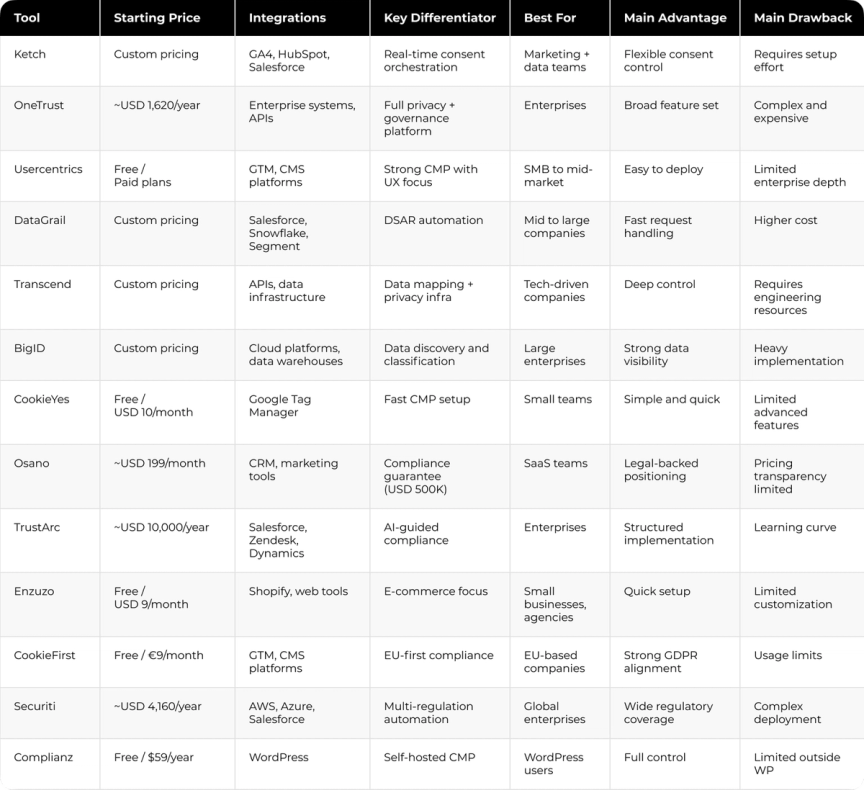
Comparison Table
How Darwin Can Help With Privacy Compliance
Getting a privacy tool live is only part of the work. The real challenge is connecting it to CRM, marketing automation, and analytics so consent and user preferences stay consistent across systems. Darwin helps SaaS teams map consent flows, integrate tools into existing infrastructure, and set up automated handling of user requests.
This typically includes:
- Security and ComplianceConsent architecture, tool integration, and DSR workflows for teams managing user data across multiple systems and regions
- Integrations and AutomationsConnecting consent platforms with CRM, marketing automation, and internal tools so preferences sync without manual work
With the right setup, compliance becomes part of daily operations. Teams can launch new tools, enter new markets, and adjust to regulatory changes without rebuilding their setup.
FAQs
Q1. What is the typical cost range for data privacy software for SaaS marketing teams?Costs range from free plans with limited features to enterprise platforms priced above USD 80,000 per year. Mid-market tools usually cost USD 150 to USD 500 per month. Enterprise solutions often start around USD 10,000 annually, with additional implementation costs depending on complexity.
Q2. How long does it take to implement a data privacy management platform?Implementation time varies from a few minutes to several months. Basic tools can be deployed quickly, while platforms with integrations, data mapping, and custom workflows require more time.
Q3. What is the difference between cookie consent management and full data privacy software?Cookie consent tools manage website tracking permissions and banners. Full privacy platforms handle consent, user data requests, data mapping, and compliance across multiple systems.
Q4. Do I need Google Consent Mode v2 certification for my data privacy tool?Yes, if you run Google Ads in the EU. Certification ensures your consent setup meets Google’s requirements and prevents disruptions in advertising and analytics.
Q5. How can data privacy automation reduce DSAR processing costs?Automation reduces manual work by connecting systems and handling user data requests automatically. This speeds up processing and lowers operational costs.